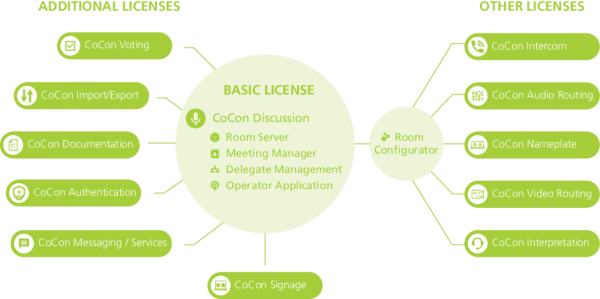
Before you can start using CoCon, you need a license issued by Televic. Different license modules are available depending on the functions your conference system requires. These range from basic functionality to a full-blown CoCon software package containing all possible CoCon functionality. The image below shows an overview of all available licenses.
Figure 1-3 CoCon license model. Some modules require the CoCon Discussion modules to function. Other modules such as the Nameplate can work independently of the Discussion module, it only requires the Room Configurator. Each CoCon module always contains the Room Configurator. The same applies to the API, each module has this.
There are two types of licenses:
This license includes all functionality required to run a discussion-only conference system. It is perfect for meetings that do not require electronic voting or simultaneous interpretation. Included functionality is delegate management, meeting management and control, microphone control, etc. The license includes the Room Server, Operator Application, Meeting Manager and the Room Configurator.
CoCon Signage is the display application within the CoCon software suite. It is an add-on to CoCon Discussion, so the latter is required to run CoCon Signage. CoCon Signage can be used to display information to the delegates in the room using large screens or projectors. The license of the CoCon Signage specifies how many signage screens can be simultaneously active.
This license is required if you want to use CoCon with badges for participant identification. With this license you link delegates from the database to badges. For each delegate, a badge can be created, which he or she can then use to identify himself in the system.
The Voting module contains all functionality that relates to the configuration and execution of voting. This module allows you to create voting agenda items and templates. You can also start, stop and control voting sessions as well as visualizing the voting results.
This license provides additional functionality to import and export data to and from CoCon from various formats (XML, Word), as well as providing advanced printing features.
With this license, it is possible for the delegates to send messages to one another, and request configurable services. This license is only applicable when using uniCOS multimedia units.
With this license, it is possible to add documents to the meeting. The delegates can consult these documents whenever they want, or the Operator can oblige delegates to view these documents. This license is only applicable when using uniCOS multimedia units.
This license allows you to use the Video application to configure the multi-video stream capabilities of the Plixus system. Here you can configure the routing of the video inputs and outputs. You can also create request and talking heads input and output groups.
This license enables the intercom functionality of the Plixus conference devices. When configured, up to 25 simultaneous, private (point-to-point) calls between chairperson units, delegate units and interpreter booths can be made during the conference. Additionally, Dante channels can be appointed to connect external intercom systems. These connections are controlled through the API.
This license allows the use of the Interpreter Application. It also allows you to define the booth, desks and languages used in the conference setup. For these settings you need the Room Configurator application and the Interpretation application.
This license allows the use of the Audio Application. With this application, it is possible to define audio groups, create a matrix of the audio inputs and outputs and control the auxiliary and Dante audio inputs and outputs.
This license includes the web based management software to easily and quickly configure the content of the Plixus Nameplate. Data can be provided by the existing CoCon delegate database, imported from an Excel list or inserted manually.