Configure the synoptic for a specific meeting
On the Synoptic tab you can place the delegates you added to the meeting on the seats present in the room. The main objective here is to assign the delegates added to this meeting (shown in the column on the right Delegates in this meeting) to the seats defined in the meeting room. You can achieve this by performing one of the following three actions:
- Drag-and-drop: click-and-hold a delegate in the list with delegates in this meeting, and drag it to a seat in the synoptic.
- Use the button Position all in the Associate part of the Synoptic ribbon. This will position all the delegates in the list to the seats with the same identification number in the synoptic. CoCon uses the number in front of the delegate. Note that this feature is only available if no delegates were assigned to a seat.
- Use the functionality Position by click. When you activate this function, a delegate is highlighted in the list with Delegates in this meeting. When you click on an empty seat, the highlighted delegate will be put on that seat. Click Skip delegate to skip the next delegate.
Note that as a result of these actions the colored square in front of the delegate name changes:
- Red: not positioned on a seat in the room;
- Green: positioned on a seat in the room.
Click the “+” in front of the delegate to view the groups the delegate belongs to. Click “X” to remove a group from this delegate for the duration of the current meeting.
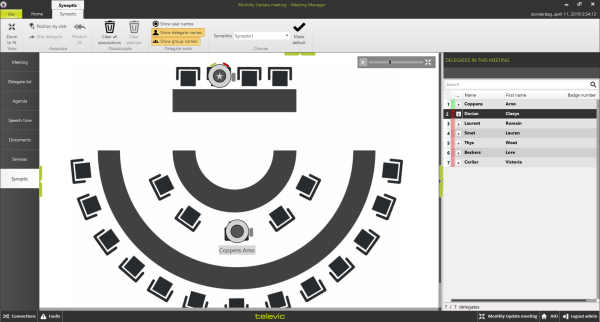
Figure 1-24 The Synoptic tab in the Meeting Manager application
The following functions are available in the ribbon on top of the screen:
- Zoom to fit: Click this button to zoom the synoptic view to fit the current visible area.
- Position by click and Skip delegate: see previous paragraphs.
- Position all: see previous paragraphs.
- Clear all associations: This button will clear all the associated delegates.
- Clear selected: This button will clear the delegates from the selected nodes.
- Three toggle buttons determining what information to show on the seats in the synoptic screen:
- Show seat names
- Show delegate names
- Show group names
- Make default: save the configuration of the toggle buttons to automatically use these settings the next time you use the Meeting Manager.
- Choose synoptic: This allows the user to select the preferred synoptic, if multiple are configured in the Room Configurator. The assignment of delegates onto the synoptic is automatically synchronized to all synoptics.
Note that the synoptic window in the Meeting Manager also shows the following information:
- Badge capability and information: to the right of the seat, a small square is visible if the unit has a badge reader/writer. The following color code is used:
- Grey for a badge reader without a badge
- Green for a badge reader that has a badge inserted
- Voting indications for the seats with units that can vote.