Messages
This functionality is only available on a system containing multimedia devices.
From the Operator Applications you can send messages to all delegates, as well as to the other Operator Applications that are connected to the same Room Server. Interactive delegate units can also send messages to all other delegates. Only chairman delegate units can send messages to the operators.
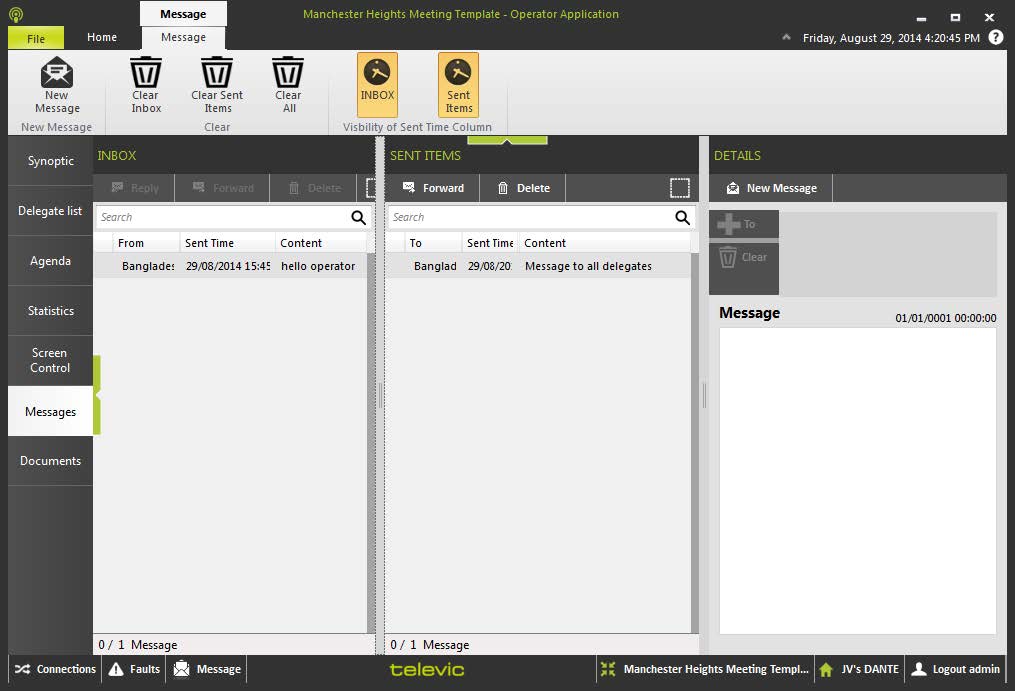
Figure 1-47 The Messages window in the CoCon Operator application
In the Messages tab the operator can send and receive messages to and from delegates and operators.The screen consists of three main parts:
- INBOX: this column contains the messages received by this Operator Application. Messages are shown with the following attributes:
- Its full content will be shown in the column Details.
- Reply: reply to the sender of the message.
- Forward: forward the message to another delegate or operator.
- Delete: delete the selected message.
- SENT ITEMS: this column shows the messages that were sent by this Operator Application. Messages are shown with the following attributes:
- Its full content will be shown in the column DETAILS.
- Forward: forward the message to another delegate or operator.
- Delete: delete the selected message.
- DETAILS: this column shows the messages if you select them in one of the two other columns.Here you can also create new messages by clicking New Message. The following options are available:
- Send: click this button to send the message.
- Cancel: Cancel the creation of a message.
- To: this button opens the following dialogue box.
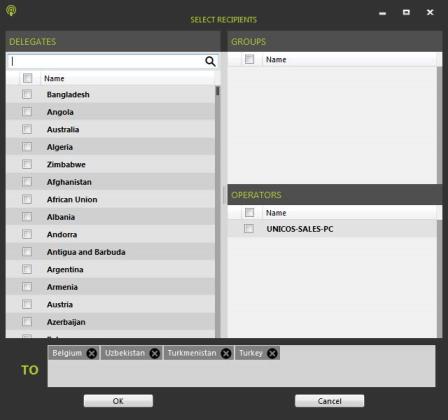
This window allows to select recipients using three possible ways:
- Delegates: the list of delegates. You can use the Search box on top to filter the complete list of delegates. Select the delegates using the checkbox next to their name.
- Groups: if there are groups defined, you can send messages to an entire group. Check the box next to the name.
- Operators: it is possible to send a message to another Operator Application connected to the current Room Server. Operators are shown with their computer name.
You can delete recipients by clicking the X next to their name. Click either OK or Cancel to exit this window.
- Clear: this clears all recipients
- Message: enter your message here
If a message arrives, the status bar will show an indication that you received a message. Click on the popup, or the Messages button to view the message.