CoCon Signage is Televic Conference's software application to display meeting information on a large screen or projector for large audiences. You can display different types of information such as:
All configuration of the signage screen goes through a web-based application. Licenses determine the amount of screens that can be active at the same time. In parallel you need CoCon Meeting manager and Operator to create and manage your meeting.
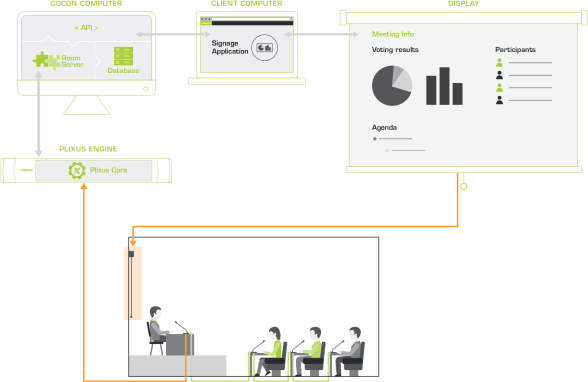
With the signage application, you can display a multitude of meeting related information that is present in CoCon Core on a screen of your choice. To use signage, CoCon Core needs to be running on a dedicated computer. Connect CoCon Core to the central unit of your conference system present in the room. With CoCon Core you can control all your meeting settings and microphones.
The signage application is part of the CoCon Core software suite. It is a web-based application that you can run on every computer that resides inside the network (to access the computer where CoCon Core is running on). With the application, you can configure different signage templates which contain different screen events. These screen events determine which content to display on the screen when specific events occur during the meeting. For example when the meeting is paused or during and after voting. For more information on signage templates and screen events see "Understand signage templates" on page 1.
Besides signage templates, you also require screens. These are the devices where you display the meeting content on. You can have multiple screens, but your license determines the number of screens that can be active at the same time.
Figure 1-51 How CoCon works in a conference setup. Install CoCon Core on a dedicated computer which has access to the Plixus engine. You can then access the signage application on the CoCon computer or any other computer that is part of the network.