The Audio application is the CoCon application for the configuration of your audio routing settings. In the Audio application you can perform the following actions:
The combination of these settings forms an audio configuration. This configuration includes the following settings:
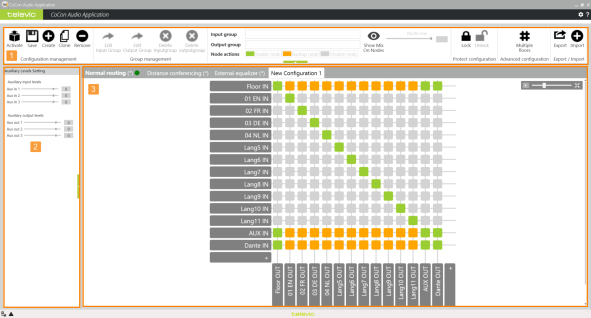
The Audio application consists of a single page that contains all functionality. There are three different sections, where you can view and edit audio routing information. The image below shows the three different types of information and functions that are available in this application.
Figure 1-73 Audio routing overview
Contains all direct control for the audio configurations and the matrix. You can also select nodes using the INPUT and OUTPUT group field.
These values correspond to the auxiliary settings configured on the Plixus web server (Audio routing page).
This is the main part of the application and gives a visual representation of the audio routing
Each Plixus system contains three default audio routing configurations. These are always available and you cannot alter these configurations. The following configurations are available: