Configure the Routing Matrix
Each configuration has a routing matrix. For predefined configurations it is not possible to modify the matrix. Configurations you created yourself (completely new or cloned), are fully adjustable. Each matrix consists of the following default groups:
- Floor input/output
- Language channels input/output
- Auxiliary input/output
- Dante in/out 1
The number of language channels is by default limited to 11. To change this, go to the Defaults page in the Room Configurator.
The language channels are reserved in the system. This means that, independent of the languages or the interpretation configuration, a routing configuration can be created. The only thing that depends on the interpreter configuration, is the label of the language channel.
Add input groups
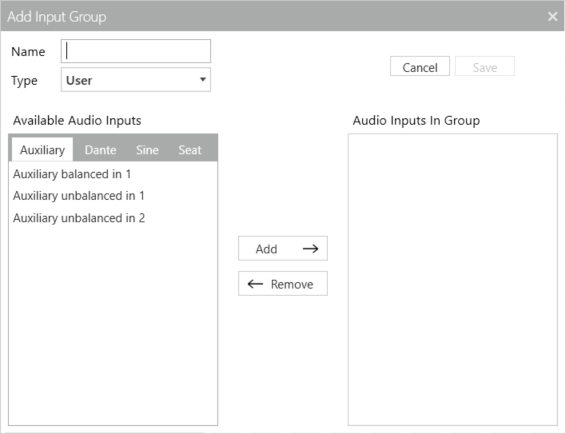
To add a new input group, click the Add button with the + sign, on the bottom of the input group list. A pop-up window opens, where you can define the following settings:
- Name: specify a unique name for your input group
- Type: there are two types of input: User and Ambiance (enabled Dante audio input when no microphone is active). Depending on the selected Type, different audio inputs are available (only Dante audio input for Ambiance type).
- Auxiliary Audio Inputs: shows all available audio inputs:
To add the audio input to your input group select one or more inputs from the available tabs (press and hold SHIFT key to select multiple items) and click the Add button. Use Remove to delete inputs from your input group. Finally, click Save to save the input group. When saving the group, the audio will be interrupted as the group is immediately saved in the configuration.
An input group can only contain a maximum of 7 input sources.
You cannot edit or remove the Floor IN and Language groups.
Add output groups
To add a new output group, click the Add button with the + sign, on the bottom of the output group list. A pop-up window opens, where you can define the following settings:
- Name: specify a unique name for your output group
- Type: there is only one type of input: User.
- Auxiliary Audio Inputs: shows all available audio inputs:
- Dante: shows all 64 Dante channels. When there is no Dante card installed, this list is empty.
- Seat: contains all configured seats from the Room Configurator. Seats means that you can group certain loudspeaker of units and make a separate mix for these loudspeakers.
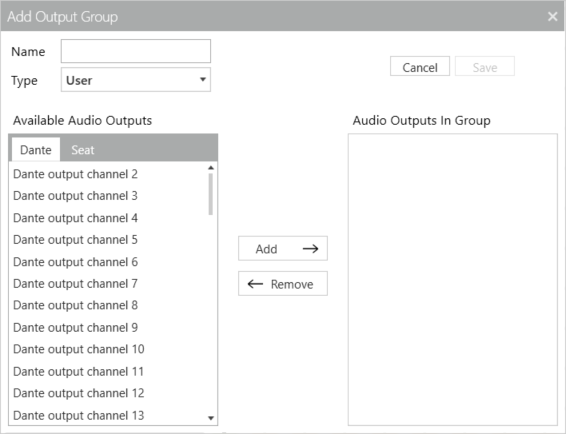
To add the audio output to your output group select one or more outputs from the available tabs (press and hold SHIFT key to select multiple items) and click the Add button. Use Remove to delete outputs from your output group. Finally, click Save to save the output group. When saving the group, the audio will be interrupted as the group is immediately saved in the configuration.
You cannot edit or remove the Floor Out group. It is possible to edit the language outputs.
An output group can only contain a maximum of 7 input sources.
Your setup can have a maximum of 63 outputs (an output group which contains 2 output resources counts as 2 outputs)
When you use the Intercom functionality, it will occupy two system channels.
Edit input and output groups
To edit input and output groups, select the node in the matrix and click the Edit Input Group or Edit Output Group in the ribbon of the Audio application. It is not possible to edit all groups, it is not possible to edit the following input and input groups:
- Floor IN input group
- Language input groups
- Floor OUT output groups
- None of the contains of the predefined or locked configurations
Change node status
You can change the status of a node in the matrix itself without using the buttons in the ribbon. The following shortcuts are possible: