 icon next to it.
Using the video application you can configure
All these settings you can combine in a video configuration. CoCon stores all these configurations on the engine. In the Plixus web server, you can select which video configuration to use. For more information on how to select the video configuration on the Plixus engine, see the Plixus user guide.
Below you can find an image of the video application and the different settings you can find and configure.
icon next to it.The video application automatically saves all changes.
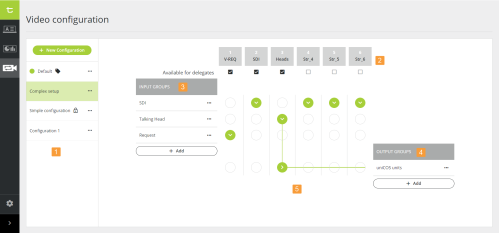
Figure 1-76 The CoCon Video application
Upon installation of CoCon, one configuration is available by default. This configuration has the name Default and has the default icon next to it. It is not possible to edit or delete this configuration. The default configuration contains one input group that contains the SDI-IN of the Plixus engine. The configuration routes the SDI input to the output group all selectors. This group contains all Video-OUT (V-OUT) boxes and Lingua ID MM present in your Plixus network.
This configuration is always present, even if you do not have a license for video routing. If you want to use this configuration and change some setting, you need to duplicate it.