Battery pack

Introduction

The Confidea wireless battery pack is used with the wireless conference units.

Output voltage 7.2V
Capacity 6600 mAh
Charge time 4 Hours
Max charge voltage 15V
Charge current 2 A
Autonomy + 28 Hours (Typical)
Read the safety instructions before using the Lithium battery.

Power supply

Controls and indicators

The battery pack contains:

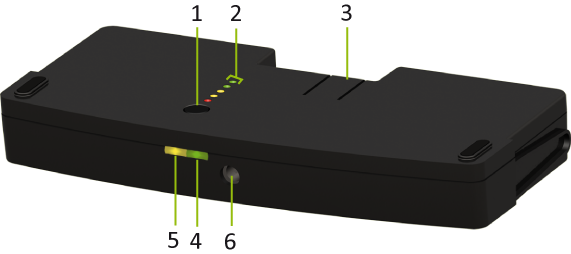
Figure 1-9 CoCon battery pack bottom side up

  1. Test button: Push to check the capacity and the status of the battery pack.
  2. Capacity and status indicator: Shows the capacity of the battery pack
  3. Clip: Locks/unlocks the battery pack in the wireless unit.
  4. Power LED: indicates that the charger is connected and powered.
  5. Charging LED: Indicates the charging status (in progress or completed) when the wall plug battery charger is connected.
  6. Socket: to connect the charger plug.

Battery charging and handling

The lifetime of a battery pack can be severely affected if it is completely drained. If a delegate unit is put in storage or is not being used for a while, remove the battery pack and place it in the charger.

Store the CoCon battery under the correct conditions: between 0 °C and 35 °C and with a relative humidity between 5% and 75 %

Installation

The indicator is a five segment LED. The first LED (LED1 closest to the test button) is red and indicates a low capacity battery. The higher the charge, the higher the number of LEDs that light up.

LED on

Remaining charge

LED 1 (red) 0-20%
LED 2 (orange) 20-40%
LED 3 (orange) 40-60%
LED 4 (green) 60-80%
LED 5 (green) 80-100%

After the display of the battery condition (for 4-5 seconds), the first three LEDs (LED1 to LED3) will indicate the status of the charging circuitry.

LED status

Description

LED 3 is blinking Charging circuitry is ok
All other indications Indicates a failure
Disconnect the charger from the battery pack and remove the battery pack from the conference unit.