Table top units
Introduction
The contribution units consist of delegate and chairman units. Both are used for speech reinforcement in a conference room. The chairman units are used to guide and control an ongoing discussion. There are two types of units available: units with a fixed microphone and units with a screw lock microphone (SL). You can use both units interchangeably, meaning that your setup can be a mix of both types.
Controls and indicators
The D-Cerno delegate units have the following features:
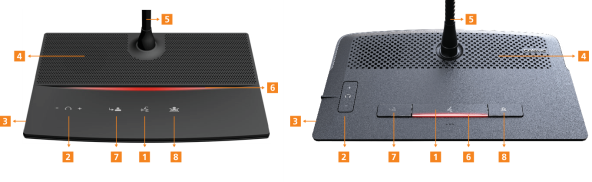
Figure 1-5 D-Cerno chairman microphone units: D-Cerno C (left) and D-Cerno C SL (right)
- Microphone button: activation / deactivation of the microphone. Indication LEDs show the status of the microphone. (red: active, green: request)
- Volume buttons: change the volume level of the headphones.
Volume change is only possible when a headphone is connected
- Headphone connector: connection of headphone to the unit. Mono and stereo headphones can be used.
- Loudspeaker: distributes the floor channel. Mutes in case microphone is active.
- Microphone (for CoCon D and C SL this is a detachable microphone which you can fix using the screw-lock connector, the microphone has an integrated LED, which show the status of the microphone)
- Status LED: Indicates the status of the unit.
- Red: unit is active
- Green: unit is in request mode
- Pressing the Next-in-line or PRIOR button on a chairman unit is indicated by illuminating the corresponding part of the led bar (not for CoCon D and C SL).
- NEXT button: (chairman unit only): Grants the floor to the next delegate in the waiting list.
- PRIOR button: (chairman unit only):
- Press and hold: temporarily mutes the microphones of all active units
- Press and release: deactivates the microphones of all active units