 allows entering the different settings as described below. All selected settings are activated immediately except for “restore factory settings” which needs additional confirmation.
Configuration menu selection allows entering the different settings as described below. All selected settings are activated immediately except for “restore factory settings” which needs additional confirmation.

Adjust the loudspeaker volume of the system. The loudspeakers setting are the same for a delegate as for a chairman. Loudspeaker volume is adjustable between 0dB and - 46dB + “OFF”

The central unit has an ECO function where the system goes into low power mode when no sound has been detected for more than 30 minutes. You can enable and disable the eco mode.


When the factory settings reset is selected and confirmed, the CU will reboot with its default settings (See "Default settings" on page 1).

Displays general system info as shown in example below. This contains the software version, serial number, IP address, subnet mask and MAC address of the CUR.


Adjust the headphone volume of the CU. The headphone volume of the central unit can be adjusted via the central unit menu.

Whenever the chairman uses the prior button, a chime will be audible. The chime mode can be set on or off.
Whenever an installation requires more than 50 units the system can be extended using 1 or 2 extra central units in a master/slave configuration. The system can be extended to a maximum of 150 unit. One D-Cerno central unit acts like a master whereas the other central units are configured as slave units.
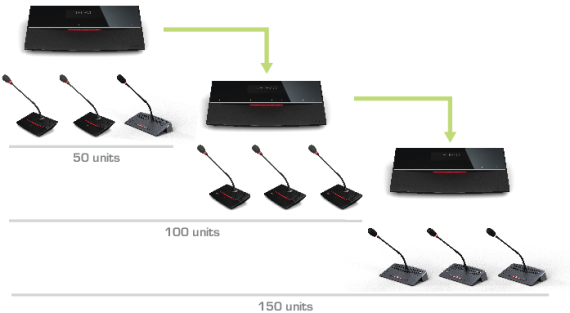
Figure 1-11 A master-slave configuration with multiple CoCon central units
If the master icon ( ) is selected, the D-Cerno central unit will then act as a master. If the slave icon
(  ) is selected, the D-Cerno central unit will then act as a slave.
Also, the recording functionalities and audio insert functionalities are disabled on slave central units.