
There are 3 limiter gain presets to choose from. The choice between these 3 will depend on the distance between the speaker and the microphone. This setting influences the sensitivity and the dynamic range of the microphones. Each step (far, average, and close) results in halve or double of the distance needed to have the same output level.
Below you can find the relation between microphone sensitivity preset, used distances between microphone and speaker and output level.
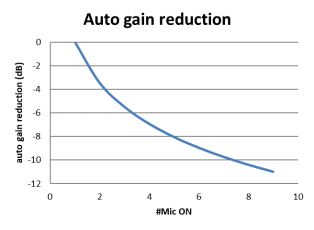
There is also a fixed automatic gain reduction setting that reduces the volume per active microphone depending on the total number of active microphones. See graph below:

The maximum amount of open microphones at the same time can be between 1 and 8. The value of this menu item is represented by a number of delegate icons. For example four open microphones will look like this: 
On top of the maximum number of active delegates it is possible to activate a maximum of 8 chairman units.