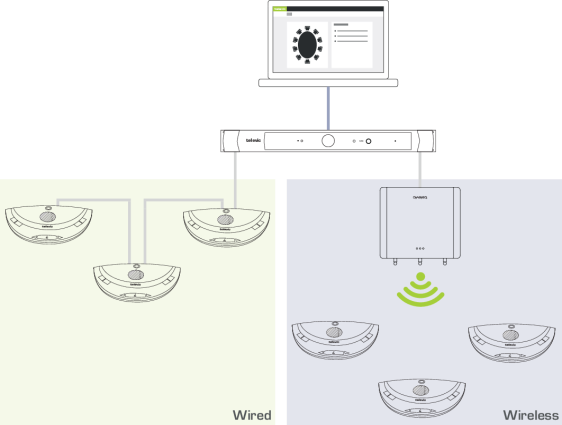
With CoCon it is possible to combine wired and wireless units this can be the case when disabled people require a wireless microphone. You can also use the wireless units to extend the amount of people that can join the meeting. A third reason to combine wired and wireless, is to use the wireless system as backup.
Figure 1-33 How to combine wired and wireless units in a single CoCon setup
In the Confidea G3 unit product range, multiple units that can support that support channel selection are available. Couple such units with the CoCon engine to receive the channels from the Lingua Interpreter Desks in your CoCon network.
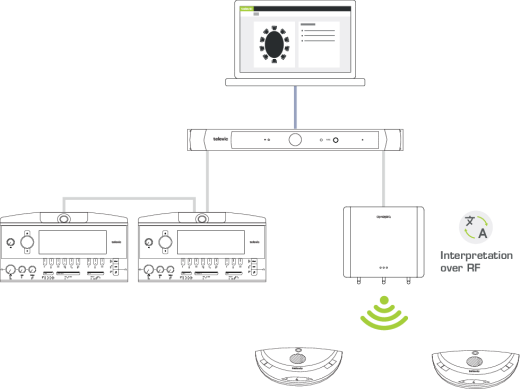
Figure 1-34 How to distribute languages using radio frequency
Improve the range of your room by using multiple WCAPs. By using multiple WCAPs you are able to connect to much more units spread out over the entire meeting room. For more information on how to position the WCAPs for optimal transmission see the Confidea G3 dedicated user guide.
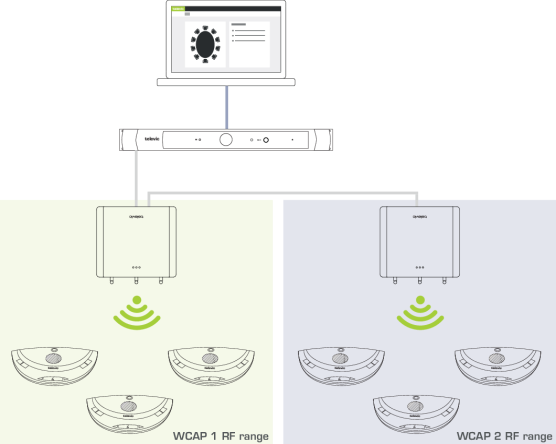
Figure 1-35 Improve the range of your system by using multiple WCAPs
Use the WCAP in standalone mode for small meetings. For larger meetings you can combine multiple rooms by coupling the WCAPs with the CoCon engine. In this way you can manage all units centrally using the CoCon engine and web server.
When you need to split the room again, simply uncouple the WCAP from CoCon. The WCAP will go back to standalone mode where it remembers all its previous settings.
The CoCon engine will remember the WCAPs once they were coupled. Just couple them using the web server whenever you need to combine rooms.
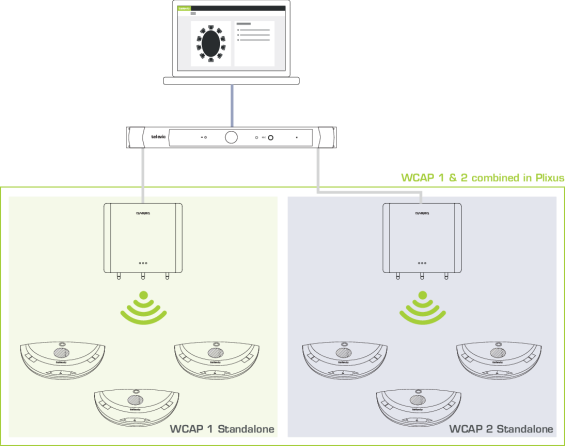
Figure 1-36 Use the WCAPs in standalone mode when you need to seperate rooms or combine to rooms into one by coupling the WCAPs to the CoCon network.
Use multiple WCAPs to create redundancy. When one WCAP fails you can easily switch to associated units to another empty WCAP using the web server. See "Couple with Confidea G3" on page 1
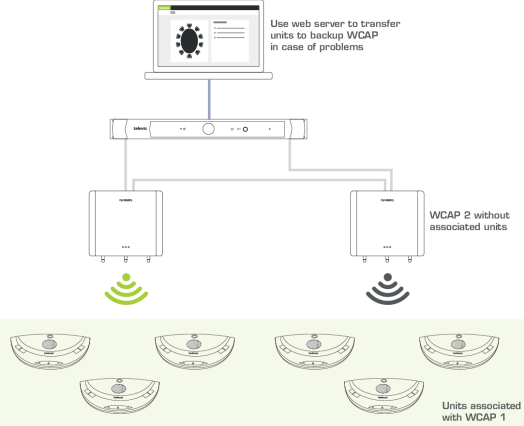
Figure 1-37 Create redundancy by having a backup WCAP in your CoCon system with no associated units. Transfer units in case of problems to this backup WCAP by using the CoCon Core web server.