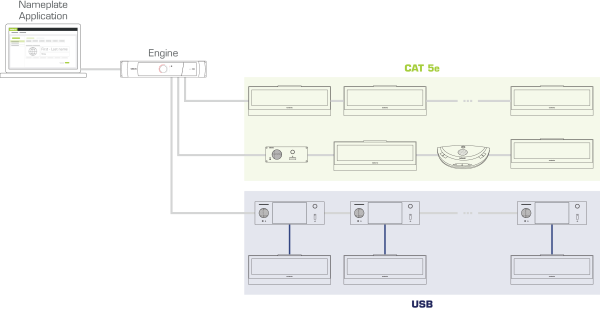
The CoCon requires a network speed of 100 Mbit. This means that when you want to use the nameplate in your Plixus network, you can only combine it with units that require the same speed (in that branch). For a detailed list of all Plixus compatible units and their network speed see the Plixus User Guide. You could, for example, combine the nameplate with a Confidea T or F unit in the same branch, but not with an uniCOS unit.
However, there is a possibility to combine the nameplate with multimedia units, such as the uniCOS units, on the same branch. To connect the units, you can use the USB connection available on both units.
Figure 1-32 How to integrate the nameplate in the Plixus network
There are two different ways of using the nameplate. First, it is possible to associate the nameplate with a delegate unit on the same seat. However, you can also use the nameplate in standalone mode. In this case the nameplate works independently of the delegate unit.
Associate a nameplate with a delegate unit on the same seat. The benefit of this setup is that the nameplate is synced with your unit. This means that when a delegate microphone is active, the LED of the nameplate will also become active. In this case you can use the nameplate together with an RFID card. When the delegate inserts his card into the unit, the nameplate can show the name of the delegate on that seat.
If you just want to use the nameplate to display delegate information independently of the conferencing system, you can use it in standalone mode. In this mode you can use the Nameplate Manager alone to configure the layout of the nameplate and display the content on the nameplate devices inside the room.
When you want to use the nameplate in standalone mode you will have to perform the following steps in the Nameplate Manager (for every step you can find the link to the description of the procedure):