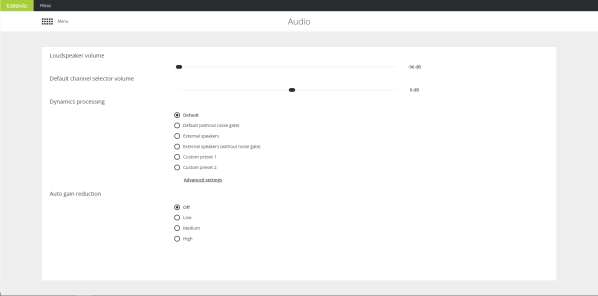
On the Audio page you can configure all general audio settings for the CoCon system.
This sets the volume for the loudspeakers in the room. The value can range from - 96dB to + 6dB. You can also change the volume by turning the control dial of the MME or volume dial of the AE-R.
The dynamics processor settings are global settings that are applied to every microphone unit individually. These settings determine the dynamic range of the audio input.
There are four default presets available for the user, for a detailed description of these presets see the table below. Click Advanced settings to see these presets and edit them. However, you cannot overwrite predefined options, you can only save changes as Custom preset 1 or 2.
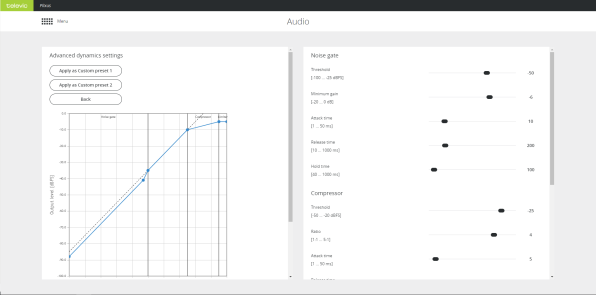
Figure 1-63 Figure 3 13 - Audio - Advanced dynamics settings
Auto gain reduction reduces the amount of gain in signal in function of the amount of open microphones. As the number of open microphones causes the noise to go up, a gain reduction can increase the intelligibility. There are four presets available with different gain curves:
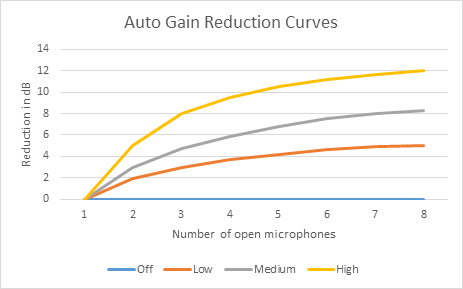
In rooms where the acoustics are very good, the auto gain reduction may be turned off. In smaller rooms or rooms where external speakers are quite close to certain microphones, it can be challenging to have enough intelligibility everywhere without feedback. Therefore a medium or high setting may be required.