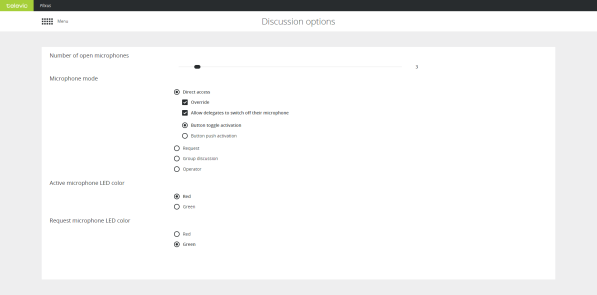
In this chapter you will find all information to configure the most important settings of your meeting. These settings are the number of open microphones, the microphone mode and the color of the microphone LED.
You can set the number of open microphones be between 1 and 25. This does not include the chairperson microphones. You can activate up to eight additional chairperson microphones on top of the 25 delegate microphones.
Different microphone modes are available and depending on the mode, you can configure additional settings.
With direct access delegates can activate their own microphone by pushing the microphone button. The following additional settings are available:
In request mode you do not automatically get the floor when you activate your microphone. First you have to request the floor. The chairperson then assigns the floor to a speaker using the next-in-line button (or using the operator page, CoCon or the API). Which delegate may speak first is defined by the first-in-first-out principle. The chairperson units (or VIP units) can always speak immediately and do not have to request the floor.
For request mode additional settings can be configured:
Voice activation (VoX) is a mode where the microphone button is not used. The microphone becomes active when it detects sound above a certain threshold. You can configure Voice activation in the Group discussion mode. The following settings can be configured:
Group mode is a semi-automatic mode for standalone conferences where less protocol has to be followed and no operator is available. Pressing the microphone button activates the microphone unless the maximum amount of open microphones is reached. In this case the microphone will go into request mode. When another microphone becomes inactive, the first unit in the request list will become active.
This mode has 3 activation types: toggle, push to talk and vox.
With the operator mode delegates cannot activate their own microphone. Only a command from CoCon, the operator page or the API can activate these delegate microphones. Delegates can deactivate their microphone by pressing the microphone button. Chairman can always activate microphones and use the priority button if he wants to switch off the delegate microphones.
Change the LED color of an active microphone or a microphone in request. By default the LED of an active microphone is red and for a microphone in request green.