Network settings
On this page you can adjust the network settings of the CoCon engine and configure the camera protocol which to sent from the CoCon engine to the camera tracking system. Here you are also able to enable the API.
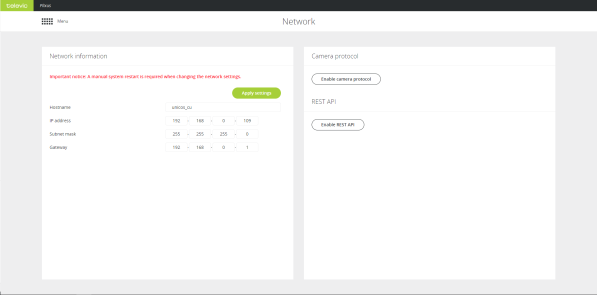
Figure 1-70 Network settings page
Network information
You can configure the following network parameters:
| Hostname |
Is the name of the CoCon engine. |
| IP address |
The IP address to access the engine, default value is 192.168.0.100. When you change the IP address, you need to restart the engine to complete the action. |
| Subnet mask |
Default subnet is 255.255.0.0 |
| Gateway |
The access point to another network. |
Camera protocol
Camera protocol is disabled by default. When you enable the camera protocol you can configure the following parameters:
| Camera protocol |
Select the protocol you want to use. Two protocols are available: TLVCAM 1 and TLVCAM 2. These are the most commonly used camera protocols that are also provided with CoCon. For more information on camera protocols see the appendix. |
| Network protocol |
Both TCP/IP and UDP are provided. |
| Port |
This is the port on the client where the camera protocol is either sent to (UDP) or where the third party client has to listen to on the CoCon engine (TCP) |
|
IP address
|
When you select UDP you need to specify the IP address of the destination (third-party).
|
Commands for TLVCAM1 protocol
All commands sent for this protocol start with a ‘%’ sign. The last character is a character that states the end of the transmission. Just before the end of transmission character, there are four characters within the command sent to the camera control which account for the CRC checksum. The CRC checksum is in uppercase hexadecimal form while all other numbers are in decimal form.
The protocol is described as follows: STX ‘%’ data CRC ETX with:
- STX = start transmit char (0x25 = ‘%’)
- ETX = end transmit char (0x0D)
- CRC = 16 bit sum of the ASCII characters between STX and CRC
All commands sent by the protocol, need to be acknowledged by the camera system! For UDP connection this is not necessary. The protocol will retransmit the command up to 3 times if no acknowledge is received. The acknowledge frame is 1byte long and holds the value 0x06.
We will adopt a certain notation to explain the messages sent. All separate entities in a message are represented between curly brackets. If the contents of such an entity is also between quotes (‘ ‘) then this means that this is a literal string. Otherwise it describes the logical entity. A logical entity will also contain a number between brackets. This number states how many characters the entity will exist of. If the subtext 1+ is attached to the entity between curly brackets, then this means that one or more occurrences of this entity may occur.
Whenever a microphone of a delegate or the microphone of the president is activated, then a command is sent to the camera control. Whenever an active microphone is deactivated, another command is sent to the camera control.
- The microphone of the president is activated: {STX}{‘P’}{Microphone number (4)} {CRC (4)}{ETX}
- The microphone of the president is deactivated: {STX}{‘p’}{Microphone number (4)} {CRC (4)}{ETX}
- The microphone of a delegate is activated: {STX}{‘M’}{Microphone number (4)} {CRC (4)}{ETX}
- The microphone of a delegate is deactivated: {STX}{‘m’}{Microphone number (4)} {CRC (4)}{ETX}
The remaining commands are control commands.
- All active microphones are deactivated and the camera control should reset itself to a neutral starting position.
{STX}{‘R’}{CRC (4)}{ETX}
Examples
- If the president microphone is activated, and the president microphone has the number ‘0001’ then the following message is sent: %P00010111
- When the president microphone is deactivated, then the following message is sent: %p00010131
- If a delegate microphone is activated, and that delegate microphone has the number ‘0003’ then the following message is sent: %M00030110
- When the delegate microphone is deactivated, then the following message is sent: %m00030130
- Suppose now that the delegate microphone with number ‘0003’ is active. On a synchronization check the synchronization message will look like this: %S00030116
- Suppose now that the delegate microphones with number ‘0002’ and ‘0004’ are also active. On a synchronization check the synchronization message will look like this: %000300020004029C
- When no microphones are active, then the following synchronization will be received: %S00000113
- When the camera control system should reset itself to its start position, then the following message will be received: %R0052
- When all microphones are deactivated simultaneously, then the following message is received: %V00000116
Commands for TLVCAM2 protocol (Philips)
All commands sent by this protocol start with a ‘$’ sign or ‘&’ and commands are terminated with a CR(0xd) and LF(0xa).
- The microphone of a delegate is activated: $1{Microphone number (4)}<CR><LF>
- The microphone of a delegate is deactivated: $2{Microphone number (4)}<CR><LF>
- All active microphones are deactivated and the camera control should reset itself to a neutral starting position: &30000<CR><LF>
- All active microphones are deactivated simultaneously: &30000<CR><LF>
Examples
- If the president microphone is activated, and the president microphone has the number ‘0001’ then the following message is sent: $10001<CR><LF>
- When the president microphone is deactivated, then the following message is sent: $20001<CR><LF>
- If a delegate microphone is activated, and that delegate microphone has the number ‘0003’ then the following message is sent: $10003<CR><LF>.
- When the delegate microphone is deactivated, then the following message is sent: $20003<CR><LF>
- When the camera control system should reset itself to its start position, then the following message will be received: &30000<CR><LF>
- When all microphones are deactivated simultaneously, then the following message is received: &30000<CR><LF>
REST API
The CoCon Core API provides a subset of commands that are available on the CoCon API. The CoCon Core API has the same communication protocol and command structure as the CoCon API which allows third-party programmers to simply change the IP address from the CoCon Room Server PC to the Plixus Engine. By default the API is disabled.
Default TCP port for API connection is port 8890
The following TCP ports are reserved for the CoCon system, do NOT use for camera control: 5011, 5012, 5111, 6011, 6012, 6101, 6111, 6212, 6312 and 8890.