System info

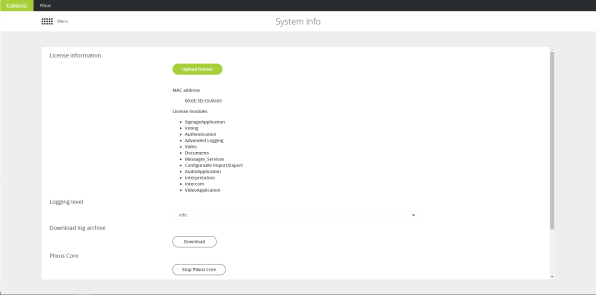
On the System info page, you can find all general system information.

Figure 1-74 The System info page

Parameter

Description

License information

Click Upload license to upload your CoCon license. Only license file with the correct MAC address (of the engine) will work. After upload this page shows all license details such as the licensed CoCon applications.

The MAC-address is the address of the CoCon engine and corresponds to the one shown on the label of engine.

Logging level

Six log levels are available: fatal, error, warning, info, debug and trace

Default value is Info.

Download log archive Click the button to download all log entries.
CoCon Core

Click the button to activate or deactivate CoCon Core.

Use this for functions that are not possible in Plixus Core and require CoCon. The web server will switch back to the old web server and you need CoCon Room Server for all functionality.

It can take some time before the web server switches over.

From CRP 6.0 onwards, this option is no longer available.

Import configuration When you install a new engine you can import configurations. This can be interesting in case your previous system is defective or you have multiple comparable rooms.
Export configuration

Export your current configuration containing the following settings:

> Initialization

> Dynamics processing settings

> Audio routing settings

> Interpretation settings

Below you can find more information on the different log levels:

Fatal: are very severe errors that prevents the system from running.

Error: logs all unhandled exceptions; the system is still running.

Warning: designates potentially harmful situations that can effect the end user, but probably does not require immediate intervention.

Info: information that is useful to the running and management of your system.

Debug: designates fine-grained informational events that are most useful to debug an application.

Trace: provides even more details than debug. Selecting this option increases memory usage drastically.

Do not use the trace log level except when explicity demanded by Televic Conference for debugging purposes, and for a short period of time. Due to increased usage of the internal processor as consequence of the large amount of data generated, the system may malfunction.