Documents view
This functionality is only available on a setup with multimedia devices.
This screen allows you to manage the documents attached to this meeting, as well as add new ones or synchronize the document scrolling with the interactive delegate units or the Signage Applications.
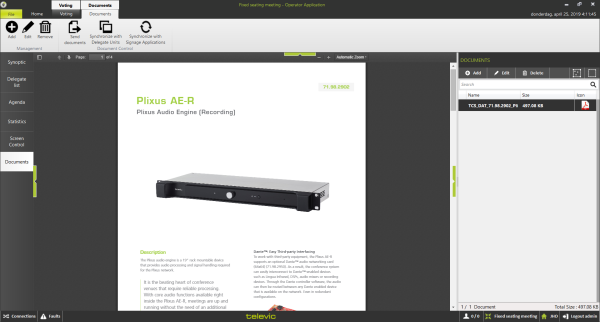
Figure 1-48 Document screen
The main panel shows a preview of the document selected, with similar controls as described in "Manage documents" on page 1.
The column on the right shows the overview of all the documents available in this meeting. Selecting a document shows it in the main panel. On top of this column, there are controls to Add or Remove a document from the list of documents in the meeting.
Documents ribbon
This ribbon allows you to manage the documents that are contained in the meeting. The following actions are available:
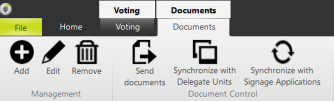
- Synchronize with Delegate Units: this activates a mode where the view of your Operator Application is the same as the delegate units. The interactive delegate units automatically puts the selected document to full screen, and follows the focus of the Operator Application. This facilitates the viewing of documents by everybody in the room. Note that the scrolling only starts on top of the page.
- Synchronize with Signage Applications: this feature shows the document currently in the Operator Application full screen in the Signage Application. When scrolling through the document, the Signage Application scrolls accordingly. Note that the scrolling only starts on top of the page.
- Add: adds a new document to the current meeting, using steps described in "Manage documents" on page 1.
- Remove: removes the selected document from the current meeting.