Configure video routing
The video routing page consists of three parts:
- Video inputs (left)
- Video streams (center)
- Video outputs (right)
For more information on how to add and edit input and outputs see "Configure video inputs" on page 1 and "Configure video outputs" on page 1.
Video streams
In the center of the video routing overview, you see the 6 available video streams. By default they have the name Str_1 to Str_6. To modify the name, simply click the name and press ENTER to save. You can select which streams are available on the delegate units at any time by checking the Available for delegates checkbox below the video stream.
The stream name can have a maximum of 5 characters.
Route the video input
In the routing matrix, different arrows indicate where the video stream is available
- the arrows pointing down indicate that an input is put onto the video stream of that column. When Available for delegates is selected, the video stream is available for selection on the multimedia units and V-OUT boxes with V-SEL panels.
- A green arrow to the right indicates that the stream is available on the video output the arrow is pointing to.
An output can only have 1 stream connected to it.
For video output boxes with a video selector, you don’t need to connect them to a video streams . All video streams are available (unless Available for delegates is not selected).
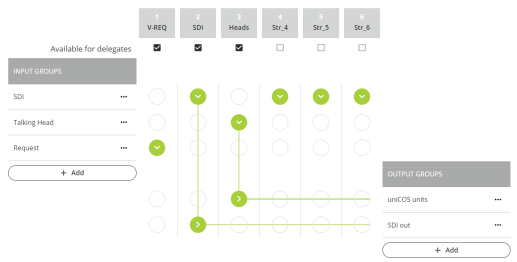
Figure 1-79 The video routing matrix of the Video application