: Start recording
 : Stop recording
 : Play / pause recording
The D-Cerno CU-R has three extra record buttons. With these buttons it is possible to start, stop or pause a recording.
: Start recording
: Stop recording: Play / pause recording
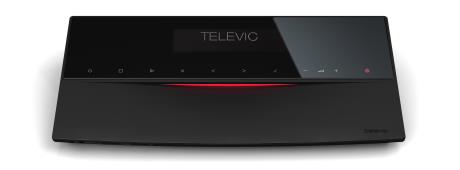
Figure 1-10 CoCon central unit with recording option
After start-up of the system, the main menu shows up.
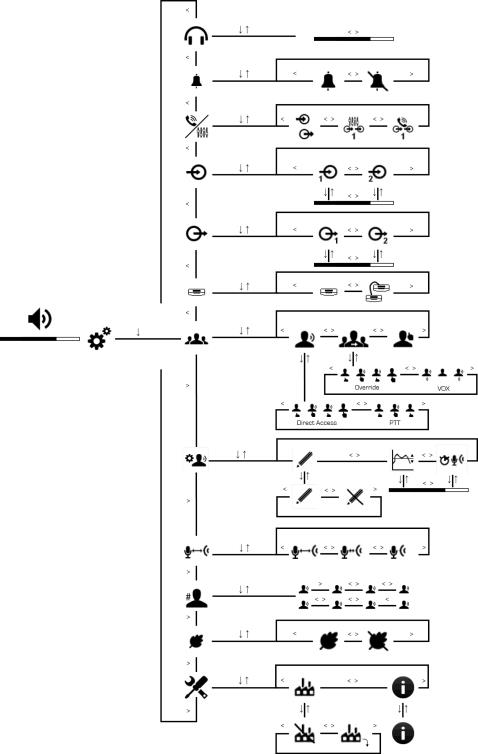
The main menu consists of a system volume section and a configuration menu entrance.
The main system volume can be adapted with the 
 keys or via the dedicated volume buttons.
The menu consists of several levels. Each level functions as a ring structure navigating from the last to first item or vice versa.
keys or via the dedicated volume buttons.
The menu consists of several levels. Each level functions as a ring structure navigating from the last to first item or vice versa.
The basic functionalities of the main menu:
|
Icon |
Function |
|---|---|

|
Enter the configuration menu |

|
Enter the next menu level |

|
Return to previous menu level |
|
|
Select previous menu item |
|
|
Select next menu item |

|
Selected item |
Adjust the loudspeaker volume settings directly on the central unit.
The menu structure on the next pages can be used as a quick reference guide to configure the conference systems.
 )
)|
Level 2 |
level 3 |
Description |
|---|---|---|

|
Direct access | |

|
Toggle | |

|
Push to talk | |
|
|
|
FIFO |
|
|
|
Toggle |
|
|
|
Group |
|
|
|
VOX |
|
|
|
Request |
 )
)|
Level 2 |
level 3 |
Description |
|---|---|---|

|
Pencil drop | |
|
|
Pencil drop | |

|
Pencil drop off | |
|
|
|
Sensitivity |
|
|
|
Sensitivity adjustment |
|
|
|
Release time |
|
|
|
Release time adjustment |
 )
)|
Level 2 |
level 3 |
Description |
|---|---|---|

|
Preset Far | |

|
Preset Average | |
|
|
Preset Close |
 )
)|
Level 1 |
level 2 |
Description |
|---|---|---|

|
Representation of speaker, maximim 8 |
 )
)|
Level 1 |
level 2 |
Description |
|---|---|---|

|
Eco Power ON | |

|
Eco Power OFF |
 )
)|
Level 1 |
level 2 |
Description |
|---|---|---|

|
Factory settings | |

|
Factory settings OFF | |

|
Activate factory settings | |
|
|
|
System information |
|
|
|
Information about software and hardware versions of the central unit |
 )
)|
Level 1 |
level 2 |
Description |
|---|---|---|

|
Headphone volume adjustment |
 )
)|
Level 1 |
level 2 |
Description |
|---|---|---|

|
Chime ON | |
|
|
|
Chime OFF |
 )
)|
Level 1 |
level 2 |
Description |
|---|---|---|

|
Independant AUX settings | |
|
|
|
External processing |
|
|
|
Remote conferencing |
 )
)|
Level 1 |
level 2 |
Description |
|---|---|---|

|
AUX OUT 1 | |
|
|
|
AUX OUT 1 volume adjustment |
|
|
|
AUX OUT 2 |
|
|
|
AUX OUT 2 volume adjustment |
 )
)|
Level 1 |
level 2 |
Description |
|---|---|---|

|
AUX IN 1 | |
|
|
|
AUX IN 1 volume adjustment |
|
|
|
AUX IN 2 |
|
|
|
AUX IN 2 volume adjustment |
 )
)|
Level 1 |
level 2 |
Description |
|---|---|---|

|
Slave configuration | |
|
|
|
Master configuration |