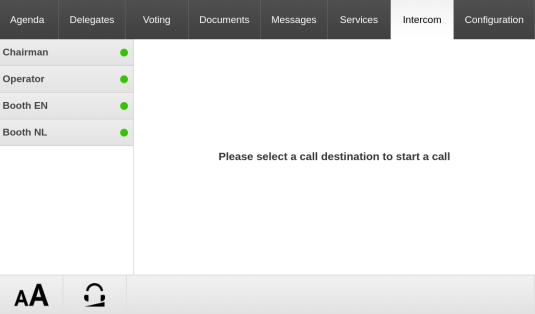
The intercom feature allows delegates and operators to call each other. You need to activate the Intercom functionality of the unit in the CoCon web server. You can find the intercom settings on the Initialization page, see "Manual initialization" on page 1 for more information. Different unit types support the intercom function:
Below you can find a description of how the intercom feature works and looks like on these devices.
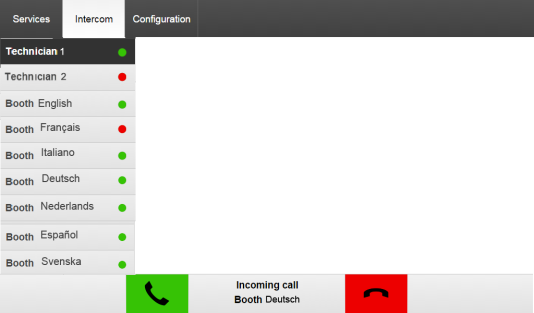
When Intercom is active, the uniCOS unit has an additional tab available in the uniCOS interface: Intercom. On the left side you see a list of all possible recipients. The names of Lingua ID are the A channel names and the names of the uniCOS units are the label of the unit (you can change this in the CoCon web server in Initialization). When you didn't use labels or set the language the name show Seat x or Booth x (x being the seat or booth number). The dot next to the name of the recipient indicates whether you can call that person, this depends on:
Select a recipient from the list on the left and press the green call button on your screen.
When a uniCOS unit receives a call, the bottom of the screen you are viewing at that time shows who is calling with a button to accept and decline the call. When the call is ongoing the bottom of the screen shows the duration of the call and a button to end the call.
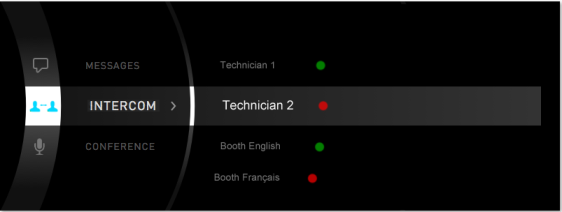
To start a call use the Menu navigation button on the unit to navigate through the menu and select Intercom. Here you can see all possible recipients and if their are available to receive a call (indicated by a dot next to their name). Press the Menu button to select the recipient and start the call.
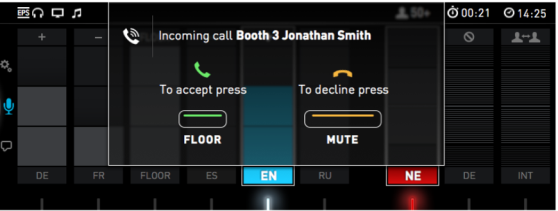
When a interpreter receivers a call on the Lingua ID:
The interpreters who are speaking (microphone active) just get a small phone icon in the top ribbon of the interface.
If somebody calls an interpreter booth, they call every desk in that booth. When someone in that booths answers the call, all notificiations disappear. When someone declines the call, the call ends completely.
Confidea units can only receive intercom calls. Depending on the type of unit more or less options are available.
When someone initiates a call with a Confidea unit, the LED ring of the microphone and the LEDs next to the microphone button start to blink green. To accept the call, press the microphone button. Only chairperson units can decline a call by pressing the Prior button  . During the call the LED ring of the microphone is inactive and the LEDs next to the microphone button blink blue (Confidea F) or green (Confidea T and G3). To terminate the call press the microphone button.